
A new version of OpenCV has been released so… Time to update!
Table Of Content
(This is an updated version of the article I wrote months ago: Installing and using OpenCV 3.2 with Eclipse and MinGW on Windows 10. )
Getting started
– You will need:
- OpenCV source code: version 3.4 or 3.3 (Link to Github repository (Latest release: 3.4.3));
- (Optional) If you want the extra modules, you will need opencv_contrib (Version 3.4.3 can be found here)
- Download MinGW-w64 and extract;
- Download and install CMake.
Configuring OpenCV
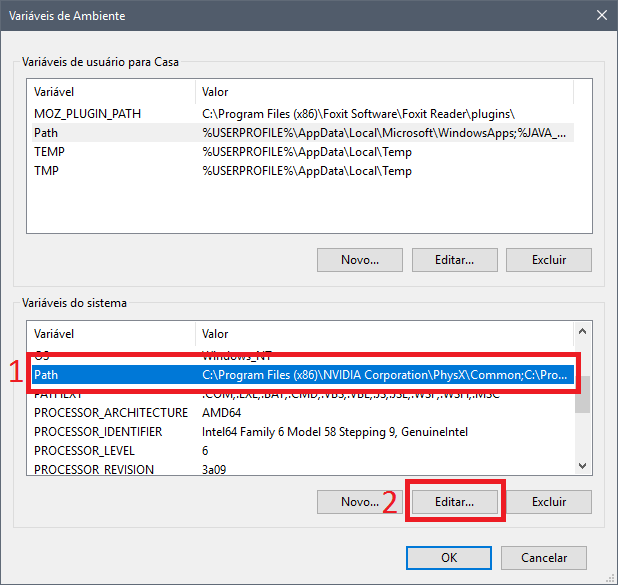
- Add MinGW to System Path
– Edit your System Environment variables (you can search for Environment in Windows’ Start Menu) ;
– Click on Path, and Edit;
– Then, hit New, and add the address of your MinGW bin folder.
- Extract OpenCV to a folder, rename it opencv_src- Inside it, create a folder named Mingw_build
Now, let’s compile OpenCV
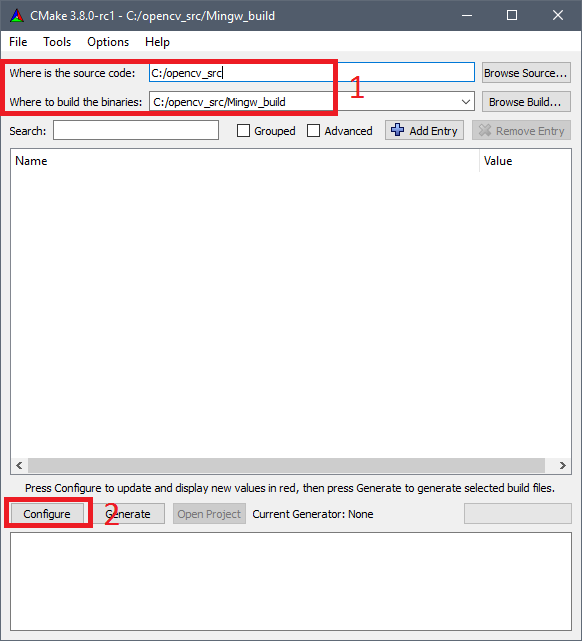
- Open CMake-gui;
- Set “Where is the source code:” to opencv_srcand “Where to build the binaries” to opencv_src/Mingw_build/
- Click on Configure, choosing Eclipse CDT4 – MinGW MakeFilein the next window, then next;
Optional Step: OpenCV_Contrib Extra modules
- If you want a simple and flawlessly working installation, just skip this step and go to the next, it’s not obligatory for you to have opencv_contrib.
- For additional info, access its Modules Github Page.
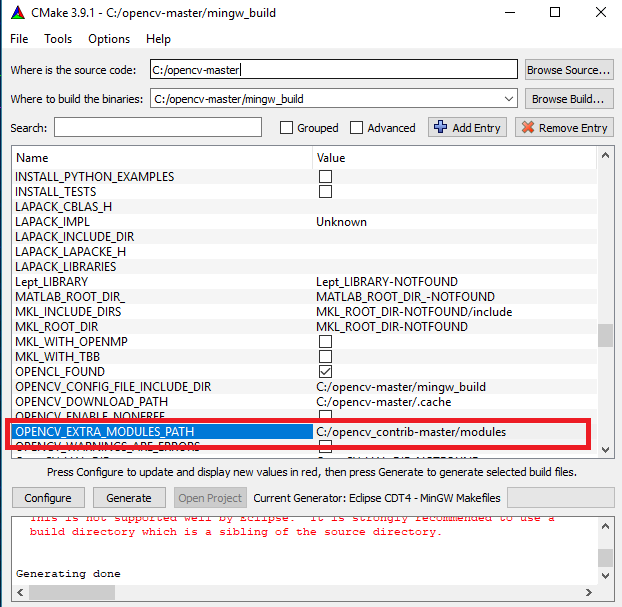
- After the “Configure” is finished, Set OPENCV_EXTRA_MODULES_PATH to opencv_contrib/modules folder
Building and Installing
- After the “Configure”, on my PC I had to deselect the options ENABLE_PRECOMPILED_HEADERS and BUILD_opencv_python3 to correctly compile.
- Hit “Generate”;
- Now, open the CMD/PowerShell, and navigate to opencv_src/Mingw_build/
- Inside opencv_src/Mingw_build type mingw32-make and hit enter;- This step probably will take a while, wait until it’s finished.
- Install using mingw32-make install
- Finally, add C:\opencv_src\Mingw_build\install\x64\mingw\binto your system path.
- I have seen errors related also to the following parameters: WITH_PTHREADS_PF , WITH_OPENCL and ENABLE_CXX11 options. Try unchecking then if something occurs.
Configuring Eclipse
- Open it and create a C++ program using the following OpenCV example:
1 2 3 4 5 6 7 8 9 10 11 12 13 14 15 16 17 18 19 20 21 22 23 24 25 26 27 28 29 30 | #include <opencv2/core/core.hpp> #include <opencv2/highgui/highgui.hpp> #include <iostream> using namespace cv; using namespace std; int main( int argc, char** argv ) { if( argc != 2) { cout <<" Usage: thisprogramname.exe ImageToLoadAndDisplay" << endl; return -1; } Mat image; image = imread(argv[1], CV_LOAD_IMAGE_COLOR); // Read the file if(! image.data ) // Check for invalid input { cout << "Could not open or find the image" << std::endl ; return -1; } namedWindow( "Display window", WINDOW_AUTOSIZE );// Create a window for display. imshow( "Display window", image ); // Show our image inside it. waitKey(0); // Wait for a keystroke in the window return 0; } |
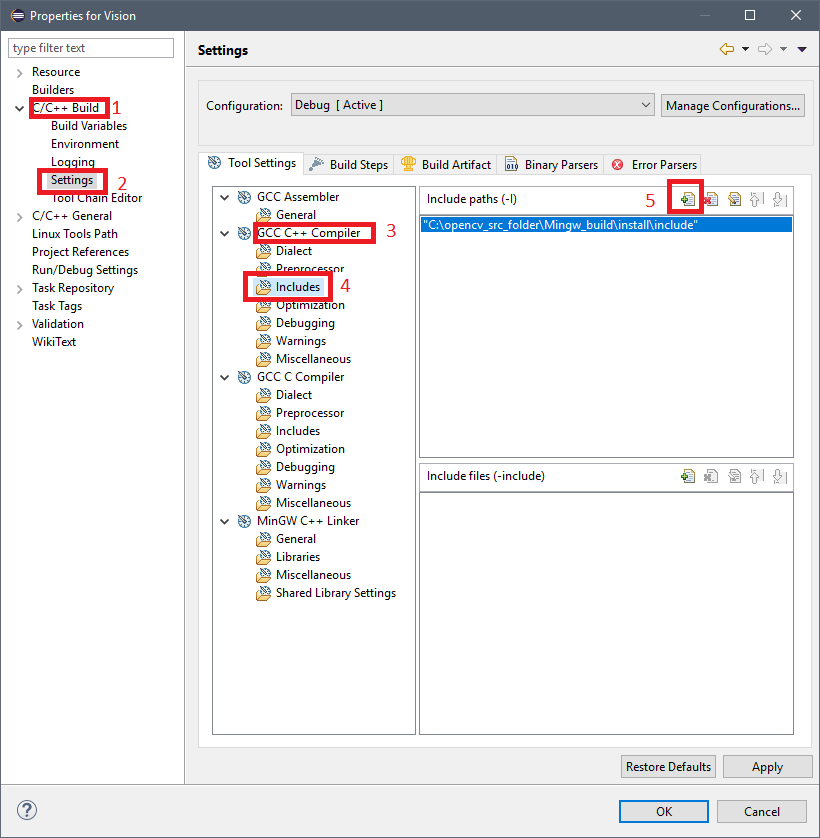
- Go to
Project > Properties > C/C++ Build > Settings > GCC C++ Compiler > Includes
and add the source OpenCV folderC:\opencv_src\Mingw_build\install\include
- Go to
Project > Properties > C/C++ Build > Settings > MinGW C++ Linker > Libraries
, and add this to the Libraries (-l), separately as shown in the image - For OpenCV 3.4:
1 | opencv_calib3d340 opencv_core340 opencv_features2d340 opencv_flann340 opencv_highgui340 opencv_imgcodecs340 opencv_imgproc340 opencv_ml340 opencv_objdetect340 opencv_photo340 opencv_shape340 |
- For OpenCV 3.3:
1 | opencv_calib3d330 opencv_core330 opencv_features2d330 opencv_flann330 opencv_highgui330 opencv_imgcodecs330 opencv_imgproc330 opencv_ml330 opencv_objdetect330 opencv_photo330 opencv_shape330 |
- If you are using a different OpenCV version, change the number at end of each lib to match your version
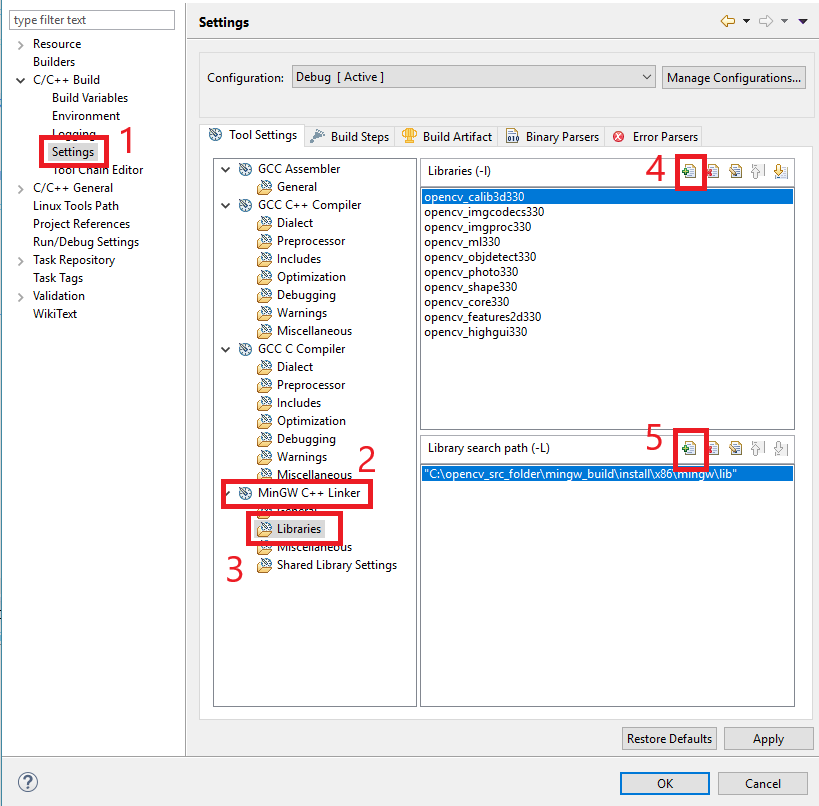
- You can add additional libraries from lib folder if you need, just follow the presented format;
- Add
C:\opencv_src\Mingw_build\install\x64\mingw\lib
to Library search path (-L); - Build the project. There are a lot of o ways of running it, e.g.:
- Open the Powershell or CMD, go to the executable folder and type:
yourprogramname.exe image.jpg - Or put the path of the image you want to show in the code, changing the following line:
- image = imread(argv[1], CV_LOAD_IMAGE_COLOR);
to - image = imread("C://YOURIMAGEPATH.jpg", CV_LOAD_IMAGE_COLOR);
- image = imread(argv[1], CV_LOAD_IMAGE_COLOR);
- Open the Powershell or CMD, go to the executable folder and type:
- Updates
04/11/17 – Changed the order of some steps;
22/11/17 – Added MinGW-w64 instead of the conventional MinGW;
11/01/18 – Added support to OpenCV 3.4
12/04/18 – Added a better explanation for running the test code
12/09/18 – Added version 3.4.3 links and error correction sentences
Have fun with your projects!
If this post helped you, please consider buying me a coffee 🙂





It doesn’t work for me.
First it complains because of SSE related stuff. So I set CPU_BASELINE from SSE2 to none (empty).
Then it says “No rule to make taget lib/libopencv_core330.dll.a’. How can that be?
I use the latest mingw and cmake. Any ideas or can I get precompiled binarys anywhere?
Hi.
Are you compiling with contrib modules? Don’t use them, unless you need.
If you’d like there’s an “official” vc14 compiled version at OpenCV’s website. I never tried it, actually.
What exactly is the SSE related stuff? Could you show the error?
it doesnt work.
Building CXX object modules/objdetect/CMakeFiles/opencv_objdetect.dir/src/detection_based_tracker.cpp.obj
This error occurs
Hi.
Try changing the ENABLE_CXX11 option on cmake.
It throw me this message of error
Makefile:161: recipe for target ‘all’ failed
mingw32-make: *** [all] Error 2
Do you know what is happen ???
Hi.
Could you provide more details with a screenshot or the last 20 lines of the error?
I am getting the same error. The snippet of the screen is in the link below:
https://drive.google.com/file/d/0B3cvBRnPDv1Kd0g3YXhMVUNuN1U/view?usp=sharing
I’m not sure if this will work, but you could try to download the unmodified 3.3 version and retry the process with it.
https://github.com/opencv/opencv/archive/3.3.0.zip
I used the one you mentioned but it doesn’t seem to work.
Shows an error “Error in configuration process. Project files may be invalid.” after I use Cmake_gui. Cant move forward.
Hello, I just tried this process and I get stuck after launching mingw32-make from the terminal. I get into some errors of this kind:
C:\opencv-master\modules\objdetect\src\detection_based_tracker.cpp:176:14: error: ‘mutex’ in namespace ‘s
td’ does not name a type
std::mutex mtx;
and many others like this. I have activated the option ENABLE_CXX11…but I don’t think this is the problem. ANy ideas?
Hi.
Disable ENABLE_CXX11 and ENABLE_PRECOMPILED_HEADERS then click on Generate again.
I’ve done everything up to mingw32-make and then there’s this error.
https://drive.google.com/file/d/0B60WcsSD4fzuUGo3TzBtRElrYmM/view?usp=sharing
Hi.
Try disabling ENABLE_CXX11 and ENABLE_PRECOMPILED_HEADERS on CMake, then hit Generate again.
I tried disabling both but it seems that I’m still receiving the same error. I forgot to mention this but I also used contrib modules.
Did you try to compile without contrib?
Just now I tried to compile without contrib and the same error is appearing. The error always occurs at the line:
Building CXX object modules/objdetect/CMakeFiles/opencv_objdetect.dir/src/detection_based_tracker.cpp.obj
Hi, sorry for the delay. I tried to reproduce your error on my PC, unfortunately without success.
I Downloaded both 3.3.1 and 3.3.0 and it worked as expected.
Have you tried another version, like 3.2 or even 3.0?
Maybe it depends on the mingw-version? Which one do you use Jean?
My
g++ --versiongives:gcc (MinGW.org GCC-6.3.0-1) 6.3.0Copyright (C) 2016 Free Software Foundation, Inc.
This is free software; see the source for copying conditions. There is NO
warranty; not even for MERCHANTABILITY or FITNESS FOR A PARTICULAR PURPOSE.
How to include also opencv_extra?
Hi.
It’s explained on the post.
How can I include Python as well?
If you wanna install it, I suggest you using pip (
pip install opencv).mingw32-make[2]: *** [modules\videoio\CMakeFiles\opencv_videoio.dir\build.make:188: modules/videoio/CMakeFiles/opencv_videoio.dir/src/cap_dshow.cpp.obj] Error 1
mingw32-make[1]: *** [CMakeFiles\Makefile2:2979: modules/videoio/CMakeFiles/opencv_videoio.dir/all] Error 2
mingw32-make: *** [Makefile:162: all] Error 2
How can I fix that errors?
Hi.
Open the file
\opencv\sources\cmakeOpenCVCompilerOptions.cmakeComment the line:
add_extra_compiler_option(-Werror=non-virtual-dtor)with an#Now it should be
#add_extra_compiler_option(-Werror=non-virtual-dtor)You are ready to Configure and Generate.
Hi
How can compile 3.4 along with contrib module with java wrapper..thanks
Hi.
Please take a look at this question on OpenCV website, I think it could help you.
Im trying to build using mingw64 and i reach 99% of the building process then an error occurs saying
“No rule to make bin/opencv-340.jar needed…”
This wrapper is something that I’m not too familiar with.
Seems to be something with Ant or your JNI. Try updating or even reinstalling them.
Hi Jean,
No matter what I do the project says it can’t find the library or include files. I built the binaries myself with CMake into a nifty installation, but for some reason it isn’t working.
Hi.
It doesn’t work during the OpenCV installation itself or when you’re trying to code something in Eclipse?
OpenCV installation is like a charm. Its when I try to run a program in Eclipse that it can’t find include/library files. I’ve even hard-coded some includes and it doesn’t find them.
The best thing I can suggest for you is to start the Eclipse config again or try to fix your Project going to
Project > C/C++ Index > Rebuild and Re-Resolve Unresolved Includes, and then left click on your Project folder and select Clean.
I don’t know what happened but I rebuilt the library, making sure Eclipse was pointing to all of the correct libs/bins, made sure all header files were included. Maybe the most important was making sure I had a path in the main system the pointed to both the bin & lib folders. Cleaned out a few paths that weren’t used anymore. And boom, we have launch (except I don’t know where the image/image file is) for demo.
The conversion to 64 bit went well so far. Eclipse Oxygen, OpenCV-3.4.0 and mingw-64 working together.
Spoke too soon. Well, everything is linking fine it seems, not I get a runtime error, crash, for some reason.
Am I supposed to put a .DLL in the executable folder?
Hi,
Usually, if you have linked everything correctly inside Eclipse it should run regardless of having a .dll inside the folder.
Could you show the error?
g++ “-IC:\\opencv_src\\Mingw_build\\install\\include” -O0 -g3 -Wall -c -fmessage-length=0 -o “src\\main.o” “..\\src\\main.cpp”
g++ “-LC:\\opencv_src\\Mingw_build\\install\\x64\\mingw\\lib” -o x64_super_vision_cam_v1.exe “src\\main.o”
src\main.o: In function
main':cv::imread(cv::String const&, int)’C:\Users\Technologist\Marble\64bit\64bit_HID_camdev\x64_super_vision_cam_v1\Debug/../src/main.cpp:21: undefined reference to
C:\Users\Technologist\Marble\64bit\64bit_HID_camdev\x64_super_vision_cam_v1\Debug/../src/main.cpp:28: undefined reference to
cv::imshow(cv::String const&, cv::_InputArray const&)'cv::waitKey(int)’ src\main.o: In functionC:\Users\Technologist\Marble\64bit\64bit_HID_camdev\x64_super_vision_cam_v1\Debug/../src/main.cpp:29: undefined reference to
cv::String::String(char const*)':cv::String::allocate(unsigned long long)’C:/opencv_src/Mingw_build/install/include/opencv2/core/cvstd.hpp:602: undefined reference to
src\main.o: In function
cv::String::~String()':cv::String::deallocate()’C:/opencv_src/Mingw_build/install/include/opencv2/core/cvstd.hpp:648: undefined reference to
src\main.o: In function
cv::Mat::~Mat()':cv::fastFree(void*)’C:/opencv_src/Mingw_build/install/include/opencv2/core/mat.inl.hpp:692: undefined reference to
src\main.o: In function
cv::Mat::release()':cv::Mat::deallocate()’C:/opencv_src/Mingw_build/install/include/opencv2/core/mat.inl.hpp:804: undefined reference to
collect2.exe: error: ld returned 1 exit status
This my output now:
g++ “-IC:\\opencv_src\\Mingw_build\\install\\include” -O0 -g3 -Wall -c -fmessage-length=0 -o “src\\main.o” “..\\src\\main.cpp”
g++ “-LC:\\opencv_src\\Mingw_build\\install\\x64\\mingw\\lib” -o x64_Marble_cam_v1.exe “src\\main.o” -lopencv_core340 -lopencv_shape340 -lopencv_photo340 -lopencv_objdetect340 -lopencv_ml340 -lopencv_imgcodecs340 -lopencv_highgui340 -lopencv_imgproc340 -lopencv_flann340 -lopencv_features2d340 -lopencv_calib3d340
src\main.o: In function
main':cv::VideoCapture::VideoCapture(int)’C:\Users\Technologist\Marble\64bit\64bit_HID_camdev\x64_Marble_cam_v1\Debug/../src/main.cpp:22: undefined reference to
C:\Users\Technologist\Marble\64bit\64bit_HID_camdev\x64_Marble_cam_v1\Debug/../src/main.cpp:22: undefined reference to `cv::VideoCapture::~VideoCapture()’
Try adding opencv_videoio340 to your MinGW C++ Linker (Project > Properties > C/C++ Build > Settings > MinGW C++ Linker > Libraries)
Hi Jean,
I’m having the error in the link while running mingw32-make.
https://drive.google.com/open?id=18bbfkcprkAKpgOUIU8Au1fDL3jSHf-v9
I’m using mingw, eclipse luna and windows 10.
Thanks,
Hi.
Are you using MinGW-w64?
Sorry I haven’t noticed your message before and my problem is not solved yet :/
Yes I installed this version of mingw
https://sourceforge.net/projects/mingw-w64/files/latest/download
I even deleted everything and started from zero with all the versions and the steps that you proposed, I had the same error.
Does your
g++ -vshow 7.1.0 or 7.2.0? I suggest using 7.2.0Yes it shows me 7.1.0, I’ll try 7.2.0 and get back to you, thanks a lot
I upgraded the version of g++, still have the same problem.. I updated the error photo in the link..
https://drive.google.com/open?id=13kbx6k8sDAzhEnIrc1tjz6oCzvCyJ8ml
Thank you..
To solve that error, you need to disable
ENABLE_PRECOMPILED_HEADERSin CMake and then click Generate.That’s worked Finally! you saved my master degree, thank you 🙂
My program is executing but I still have warning messages, like this one..
#include
#include
Unresolved inclusion:
Unresolved inclusion:
Mat image = Mat::zeros(300,300,CV_8U);
Multiple markers at this line
– Symbol ‘CV_8U’ could not be resolved
– Invalid arguments ‘ Candidates are: cv::MatExpr zeros(cv::Size_, int) cv::MatExpr zeros(int, int, int) cv::MatExpr
zeros(int, const int *, int) ‘
That’s amazing! I’m really happy to know I contributed someway.
Now it’s all about learning how OpenCV works.
In the newer versions, like 3.4, you should use
Mat::zeros(Size size, int type)Ok, I’ll search the documentation for this, what about “Unresolved inclusion” error, is the inclusions are different also?
#include
#include
This is what I’m putting..
Could you post a screenshot or repost the comment removing its angle brackets (or quotes)? The comment section seems to consider the code between angle brackets and quotes as some HTML tag.
Hi Sir again, I want to build opencv 3.4 with the extra module for java application and i follow your blog and thank you, i wanna ask if what do i need to change in my configurations because this following error occurs everytime:
in cmake this is the red lines:
CMake Warning at C:/opencv3.4/opencv3.4-master/sources/opencv-master/cmake/OpenCVDownload.cmake:190 (message):
data: Download failed: 6;”Couldn’t resolve host name”
CMake Warning at C:/opencv3.4/opencv3.4-master/sources/opencv_contrib-master/modules/face/CMakeLists.txt:26 (message):
Face: Can’t get model file for face alignment
////////////////////////////
in mingw32 this are the errors:
1st error:
mingw32-make[2]:*** No rule to make target ‘bin/opencv-340.jar’, needed by java_test/bin/opencv-340.jar. Stop.
mingw32-make[1] *** [CMakeFiles\Makefile2:14109: modules/java/test/pure_test?CMakeFiles/opencv_test_java.dir/all]Error 2
mingw32-make : *** [Makefile : 162 all] Error 2
2nd error:
mingw32-make[2]: *** [modules\xfeatures2d\CMakeFiles\opencv_xfeatures2d.dir\build.make:93:modules/xfeatures2d/CMakeFiles/opencv_xfeatures2d.dir/src/bosstdesc.cpp.obj]Error1
mingw32-make[1] *** [CMakeFiles\Makefile2:7308:modules/xfeatures2d/CmakeFiles/mingw32-mak: ***[Makefile:16:all] Error 2
3rd Error:
Error occured during initialization of VM
Too small initial heap
mingw32-make[2]: *** [modules\java\jar\CMakeFiles\opencv_java_jar.dir\build.make:61 CmakeFiles/dephelper/opencv_java_jar] Error 1
mingw32-make[1]: *** [CMakeFiles\Makefile2:8181: modules/java/jar/CmakeFiles/opencv_java_jar.dir/all] Error 2
mingw32-make: *** [MakeFile: 162: all] Error 2
THANK YOU IN ADVANCE
Hi Jean,
I followed the steps you have mentioned. Build is done successfully 🙂 Thanks for your detailed steps!!!
When i run the code, i am unable to view the Image.
The code is running inside this if loop, I can see on the output window the cout message.
if( argc != 2)
{
cout <<" Usage: display_image ImageToLoadAndDisplay" << endl;
return -1;
}
The image is copied inside the project, Is this should be placed anywhere?
I found out, there should be an argument provided in Profile configuration. Working perfectly now 🙂
mingw32-make[2]: *** [modules\coreI\CMakeFiles\opencv_core.dir\build.make:1844: bin/libopencv_core340.dll] Error 1
mingw32-make[1]: *** [CMakeFiles\Makefile2:1655: modules/core/CMakeFiles/opencv_core.dir/all] Error 2
mingw32-make: *** [Makefile:162: all] Error 2
I’m getting this error when linking cxx shared library. I’m using windows 10, any idea on how to fix this?
Could you show the error with a screenshot/message of the last 10 lines or so of your mingw32-make command?
Hi Jean,
I am trying to play an video from the file, below is the code snippet
#include
#include
#include
#include
#include
using namespace cv;
using namespace std;
int main(int argc, char* argv[])
{
//open the video file for reading
VideoCapture cap(“D:\Personal\workspace\OCV\solidYellowLeft.mp4”);
// if not success, exit program
if (cap.isOpened() == false)
{
cout << "Cannot open the video file" << endl;
cin.get(); //wait for any key press
return -1;
}
//get the frames rate of the video
double fps = cap.get(CAP_PROP_FPS);
cout << "Frames per seconds : " << fps << endl;
String window_name = "solidYellowLeft";
namedWindow(window_name, WINDOW_NORMAL); //create a window
while (true)
{
Mat frame;
bool bSuccess = cap.read(frame); // read a new frame from video
if (bSuccess == false)
{
cout << "Found the end of the video" << endl;
break;
}
imshow(window_name, frame);
if (waitKey(10) == 27)
{
cout << "Esc key is pressed by user. Stoppig the video" << endl;
break;
}
}
return 0;
}
Facing undefined reference linking error:
D:\Personal\workspace\OCV\Debug/../display.cpp:86: undefined reference to
cv::VideoCapture::VideoCapture(cv::String const&)'cv::VideoCapture::isOpened() const'D:\Personal\workspace\OCV\Debug/../display.cpp:89: undefined reference to
D:\Personal\workspace\OCV\Debug/../display.cpp:100: undefined reference to
cv::VideoCapture::get(int) const'cv::VideoCapture::read(cv::_OutputArray const&)'D:\Personal\workspace\OCV\Debug/../display.cpp:110: undefined reference to
D:\Personal\workspace\OCV\Debug/../display.cpp:86: undefined reference to
cv::VideoCapture::~VideoCapture()'cv::VideoCapture::~VideoCapture()'D:\Personal\workspace\OCV\Debug/../display.cpp:86: undefined reference to
D:\Personal\workspace\OCV\Debug/../display.cpp:86: undefined reference to `cv::VideoCapture::~VideoCapture()'
Can you help me to resolve this error?
Try adding opencv_videoio340 to your MinGW C++ Linker (Project > Properties > C/C++ Build > Settings > MinGW C++ Linker > Libraries)
linking error is resolved now.
But there is new error, cannot open output file OCV.exe -> permission denied
20:58:59 **** Rebuild of configuration Debug for project OCV ****
Info: Internal Builder is used for build
g++ “-ID:\\Personal\\opencv_3.4\\opencv\\mingw_build_3.4\\install\\include” -O0 -g3 -Wall -c -fmessage-length=0 -o display.o “..\\display.cpp”
..\display.cpp: In function ‘int main(int, char**)’:
..\display.cpp:87:19: warning: unknown escape sequence: ‘\P’
VideoCapture cap(“D:\Personal\workspace\OCV\solidYellowLeft.mp4”);
^
..\display.cpp:87:19: warning: unknown escape sequence: ‘\w’
..\display.cpp:87:19: warning: unknown escape sequence: ‘\O’
..\display.cpp:87:19: warning: unknown escape sequence: ‘\s’
g++ “-LD:\\Personal\\opencv_3.4\\opencv\\mingw_build_3.4\\install\\x64\\mingw\\lib” -o OCV.exe display.o -llibopencv_calib3d340 -llibopencv_videoio340 -llibopencv_video340 -llibopencv_core340 -llibopencv_features2d340 -llibopencv_flann340 -llibopencv_highgui340 -llibopencv_imgcodecs340 -llibopencv_imgproc340 -llibopencv_ml340 -llibopencv_objdetect340 -llibopencv_photo340 -llibopencv_shape340
C:/Tools/TDM-GCC-64/bin/../lib/gcc/x86_64-w64-mingw32/5.1.0/../../../../x86_64-w64-mingw32/bin/ld.exe: cannot open output file OCV.exe: Permission denied
collect2.exe: error: ld returned 1 exit status
20:59:01 Build Finished (took 1s.740ms)
I understand that if an .exe file is running it will not allow to rebuild it.
After killing it, it has resolved and compilation is through.
I am unable to play the video, it is failing to read the video and executing the below code
// if not success, exit program
if (cap.isOpened() == false)
{
cout << "Cannot open the video file" << endl;
cin.get(); //wait for any key press
return -1;
}
any idea?it would be really great if you can provide me the solution for this.
Hi.
I’m glad to know you’re making progress! Have you tried changing the file path
"D:\Personal\workspace\OCV\solidYellowLeft.mp4"toD:\\Personal\\workspace\\OCV\\solidYellowLeft.mp4?